
Free and Supporter
What is free, what a one-off donation unlocks, how the 2048 px limit works, how to donate and activate from the app, and managing your computers.
SnazzyFoto is free, with every tool of the Photo Editor, Develop and Collage. A one-off donation — pay what you want, from a small minimum — makes you a Supporter and unlocks full-resolution export, the AI tools (Faceswap, Select Subject, Remove with AI, Portrait's new backgrounds and face retouching, Sky Replacement, Lens Blur and more), camera RAW files and colour themes on your computer.
Free and Supporter
| Free | Supporter | |
|---|---|---|
| Photo Editor, Develop and Collage — every tool | ✓ | ✓ |
| In Develop: linear, radial and brush masks, lens profiles, Upright, colour labels, TIFF files, 360° photos | ✓ | ✓ |
| Portrait: open, compare, export, and the ID photo print layout | ✓ | ✓ |
| No watermark, no account, works offline (the AI files are downloaded once) | ✓ | ✓ |
| Export and copy to the clipboard | Up to 2048 px on the long side | Full resolution |
| AI Faceswap | — | ✓ |
| AI Select Subject (also Remove background on the Home screen), and the AI behind Select › Sky | — | ✓ |
| Remove with AI in the Photo Editor | — | ✓ |
| Portrait: new backgrounds and face retouching (shape, make-up, skin) | — | ✓ |
| Camera RAW files (Sony, Canon, Nikon, Lumix, Fujifilm…) | — | ✓ |
| In Develop: AI masks (subject, sky, depth range), Sky Replacement, Lens Blur and depth haze, AI Denoise, HDR merge, auto-sort | — | ✓ |
| Photo albums (Collage › Album): the whole editor, PDF and JPEG pages | RGB, up to 2048 px | Print resolution, CMYK PDF/X-1a and TIFF, bleed, crop marks |
| Panorama and HDR panorama (Develop › Photo Merge) | Up to 1000 px on the long side | Full resolution |
| Colour themes: Light, Midnight, High contrast, Paper, Brutalism, your own colours | Dark only | ✓ |
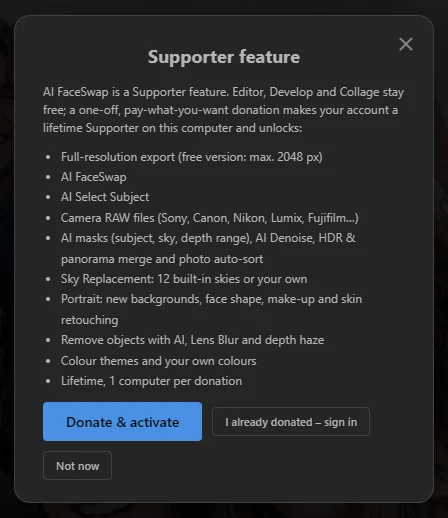
In the free version, a Supporter feature shows a short Supporter feature window when you try it. It lists everything a donation unlocks — the same list as in the Support SnazzyFoto window — and has Donate & activate, I already donated – sign in and Not now. Nothing else is ever locked, and nothing stops working after a while.
 123
- 1 Donate & activate — donate and unlock this computer (see below).
- 2 I already donated – sign in — for when you have donated already.
- 3 Not now — closes the window.
How the 2048 px limit works
In the free version, every picture that leaves SnazzyFoto is at most 2048 pixels on its long side. A 6000×4000 photo, for example, comes out as 2048×1365. The shape never changes, and a picture that is already smaller is not touched.
The limit applies to:
- Export from the Photo Editor (File › Export), from Develop (also when you export many photos at once), from Portrait and from Collage. A Portrait ID photo sheet keeps its size in centimetres but gets fewer dots per inch.
- Pictures you copy to the Windows clipboard from the Photo Editor, to paste into another program.
- Save Result in Faceswap, if the licence is no longer active when you save.
It does not apply to:
- Your work inside SnazzyFoto: you always edit at full size, and you see your photo at full size when you zoom in.
- Send to… between the modules, and copy and paste inside the Photo Editor. These stay at full size.
.snazzyprojects. They keep every layer at full size, so after you donate you can open an old project and export it at full resolution.
The status bar of the Photo Editor, and the toolbars of Develop and Collage next to Export, show Free version: export max. 2048 px as a reminder. Click it to open the licence window.
 1
Files you exported before you donated stay the size they are. Export them again after activating to get the full size.
How donating works
- Pay what you want. Choose an amount or type your own, from the minimum shown on the donation page.
- One-off. It is not a subscription. You pay once and the computer stays unlocked for life.
- One computer per donation. Each donation unlocks one computer. Donating again — or choosing more Computers on the donation page — adds more.
- Payment goes through Midtrans, in rupiah (you can also enter the amount in US dollars; the page shows the rupiah total). SnazzySoft never sees your card details.
- Per app. A donation for SnazzyFoto unlocks SnazzyFoto. SnazzyCut has its own donation.
Donate & activate from the app
This is the easiest way: one trip to the browser, and SnazzyFoto comes back unlocked.
- Click Donate & activate: on the Home screen, in a Supporter feature window, or in the licence window (Help › Support SnazzyFoto… in the Photo Editor).
- Your browser opens snazzysoft.app, and SnazzyFoto shows Opening your browser… Sign in, complete the donation, then come back to the app.
- Sign in, or create an account.
- If your account has no free computer for SnazzyFoto yet, the donation page opens. Choose an amount and click Donate, then pay in the Midtrans window.
- When the payment is confirmed, the page sends you back to SnazzyFoto by itself. SnazzyFoto says Thank you! SnazzyFoto Supporter is active on this computer., and everything is unlocked at once.
While SnazzyFoto waits for the browser, a Cancel button in the licence window stops the wait. You have 30 minutes to finish the donation in the browser.
I already donated – sign in
Donated on the website, or setting up a new computer? Click I already donated – sign in (on the Home screen, in a Supporter feature window or in the licence window) and sign in with the account you donated with. SnazzyFoto is activated if the account has a free computer for SnazzyFoto.
If the account has not donated for SnazzyFoto, SnazzyFoto says Signed in, but this account hasn't donated for SnazzyFoto yet. Click "Donate & activate". You stay signed in, and a donation you make later on the website is picked up by itself.
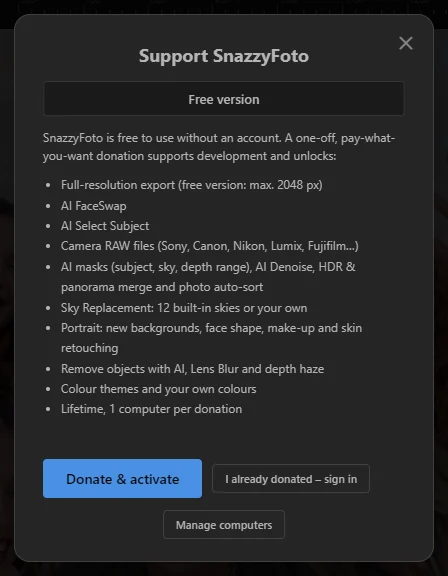
The Support SnazzyFoto window
Open it with Help › Support SnazzyFoto… in the Photo Editor, Support SnazzyFoto on the Home screen, or the button in the About box.
 1234
- 1 Your status: Free version. Under it, what a donation unlocks: full-resolution export, AI FaceSwap and Select Subject, camera RAW files, the AI masks (subject, sky, depth range), AI Denoise, merging and auto-sort in Develop, Sky Replacement, Portrait (new backgrounds and face retouching), Remove with AI, Lens Blur and depth haze, colour themes, and that it is for life, one computer per donation.
- 2 Donate & activate — sign in, donate if needed, come back activated.
- 3 I already donated – sign in — for an account that has already donated.
- 4 Manage computers — opens the list of your computers on the website.
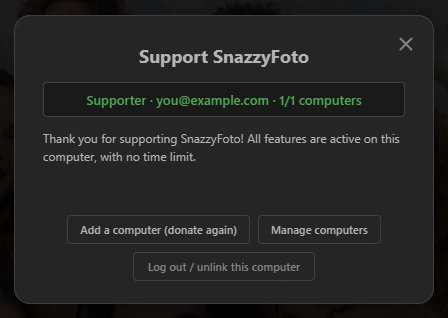 1234
- 1 Your status: Supporter, the account's email, and how many of your computers are in use (for example 1/2 computers).
- 2 Add a computer (donate again) — opens the donation page to add a computer to your account.
- 3 Manage computers — the list of your computers on the website.
- 4 Log out / unlink this computer — frees this computer's place (see below).
Managing your computers
Every computer you activate uses one of your donations. To see them, click Manage computers in SnazzyFoto, or open My devices in your dashboard on snazzysoft.app (/dashboard/devices).
- The page lists each computer with how many places are used (for example 1 / 2 seats used).
- Unlink a computer you no longer use to free its place. Then sign in on the new computer.
- From SnazzyFoto itself: Log out / unlink this computer in the licence window. SnazzyFoto asks first, then becomes the free version on this computer. Your donation stays on your account; you can sign in again at any time, here or on another computer.
If every computer on the account is in use, signing in says All your Supporter computers are in use. Unlink one under Manage computers, or donate again to add a computer.
Working offline
A Supporter licence is for life. Once a computer is activated, SnazzyFoto never needs the internet again to stay unlocked. A lost connection, a slow network or a server that cannot be reached never takes your licence away.
The internet is only needed to sign in and to donate. If you unlink this computer on the website, SnazzyFoto notices the next time it can check, and asks you to sign in again.
Questions
I bought a new computer. Do I have to donate again?
No. Unlink the old computer in My devices on the website (or with Log out / unlink this computer on the old one), then install SnazzyFoto on the new computer and click I already donated – sign in.
Do I need to sign in again after an update, or after reinstalling Windows?
Updating SnazzyFoto keeps the activation. After reinstalling Windows, the computer counts as a new one: unlink the old entry in My devices and sign in again.
I paid, but SnazzyFoto still says Free version.
Click I already donated – sign in and sign in with the same account you donated with. If it says every computer is in use, free one under Manage computers. See also Sign-in messages.
I donated for SnazzyCut. Is SnazzyFoto unlocked too?
No. Each SnazzySoft app has its own donation. Your SnazzySoft account is the same, so you can sign in to SnazzyFoto with it after donating for SnazzyFoto.
What does SnazzyFoto send to the internet?
Only what the licence needs: your sign-in, a code that identifies this computer, and the computer's name, system and SnazzyFoto version (so you can recognise it in My devices). Your photos and edits never leave your computer, and the AI runs offline. SnazzyFoto also downloads the AI files the first time a feature needs them (see AI downloads); that only receives files, it sends nothing of yours.