
ID photos (passport photos)
Make passport and ID photos: a red or blue background in Portrait, then a print sheet of 2×3, 3×4, 4×6 cm, passport or your own size on 4R, A4 and other papers at 300 dpi — print it or export a JPEG.
Make passport and ID photos at home: give the portrait a red or blue background, then let SnazzyFoto lay out as many photos as fit on one sheet of photo paper — 3 × 4 cm, 2 × 3 cm, passport size or your own — ready to print and cut.
ID photos in four steps
- Open the portrait in Portrait. A photo taken straight on, with the shoulders in view and an even background, works best.
- Under Background, click Colour and pick the red or the blue quick colour (or the colour your office asks for). Supporter
- Click ID photos at the top right.
- Choose the paper and the photo sizes, check the preview, then click Print… or Export JPEG (300 dpi).
The print layout window
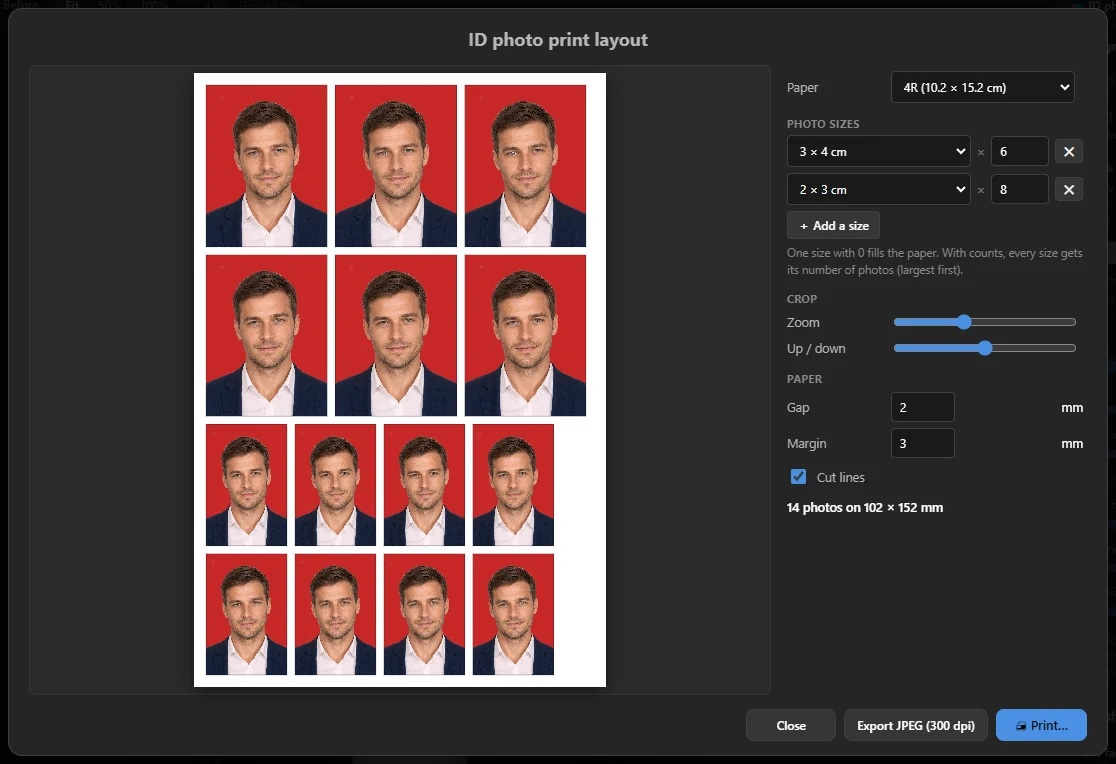 12345678
- 1 The sheet — exactly what will be printed, with thin cut lines.
- 2 Paper — 4R (10.2 × 15.2 cm, the usual photo paper), 3R, 5R, 2R, A6, A5, A4 or Letter.
- 3 Photo sizes — one line per size, with how many you want. Add a size adds another line, ✕ removes one.
- 4 Crop — Zoom and Up / down move the head inside every photo.
- 5 Gap and Margin in millimetres, and Cut lines.
- 6 How many photos fit, for example 14 photos on 102 × 152 mm. If some don't fit, it says so in red.
- 7 Export JPEG (300 dpi) — saves the sheet as a picture, to print at a photo shop.
- 8 Print… — prints the sheet on your own printer.
Photo sizes and how many
The sizes to choose from: 2 × 3 cm, 3 × 4 cm, 4 × 6 cm, 3.5 × 4.5 cm (passport, visa), 5 × 5 cm (2 × 2 in, US visa) and Custom size (type the width and height in millimetres).
- One size, count 0 — fills the whole sheet with that size. This is the default.
- Counts — type how many of each size you want, for example 4 × 3 × 4 cm and 6 × 2 × 3 cm. The largest photos are placed first; the sheet is turned whichever way fits more.
SnazzyFoto crops every photo around the head the way ID photos usually look: the head takes up most of the height, with a little room above it (a passport photo is cropped closer). If the head sits too high or too low, or too big or too small, adjust Up / down and Zoom. Double-click a slider to put it back.
Rules for official photos differ per country and office (size, background colour, how big the head is, glasses, expression). Check what is asked before you print.
Print or export
- Print… opens your computer's print window with a page exactly the size of the paper. Choose your printer and photo paper, and print at 100 % / actual size without margins, so the photos come out at the right size in centimetres.
- Export JPEG (300 dpi) saves the sheet as a JPEG. SnazzyFoto says, for example, Saved: a 10.2 × 15.2 cm sheet at 300 dpi, ready to print at 100 %. Take it to a photo shop and ask them to print it at its actual size.
The window remembers your paper, sizes and settings for next time. Close or Esc closes it.
In the free version
The print layout itself is free. Without a Supporter licence:
- The background stays as it was photographed — a new red or blue background is a Supporter feature.
- The face isn't found by the AI, so every crop shows the top middle of the picture. The window says so; place the head with Zoom and Up / down.
- An exported sheet keeps its size in centimetres but has fewer dots per inch (the free 2048-pixel limit), so it prints a little less sharp.
Questions
The printed photos are too small or too big.
The printer scaled the page. In the print window, choose the right paper size and set the scale to 100 % (or "actual size"), with no "fit to page".
It says some photos don't fit.
Lower a count, choose a smaller Gap or Margin, or a bigger paper.
It says "No face found: the crops show the top of the picture."
The AI could not find a face (or you are using the free version). Use Zoom and Up / down to place the head by hand.