
Sky Replacement
Replace the sky of a landscape in Develop with one of 12 built-in skies or your own picture: the AI finds the sky, then tune the edge, the sky's brightness and colour, foreground lighting and position. A Supporter feature.
Sky Replacement swaps a dull or white sky for a better one in one click: blue with clouds, a sunset, a storm or the Milky Way — or a sky photo of your own. The AI finds the sky, and the rest of the photo takes on the new light. Supporter
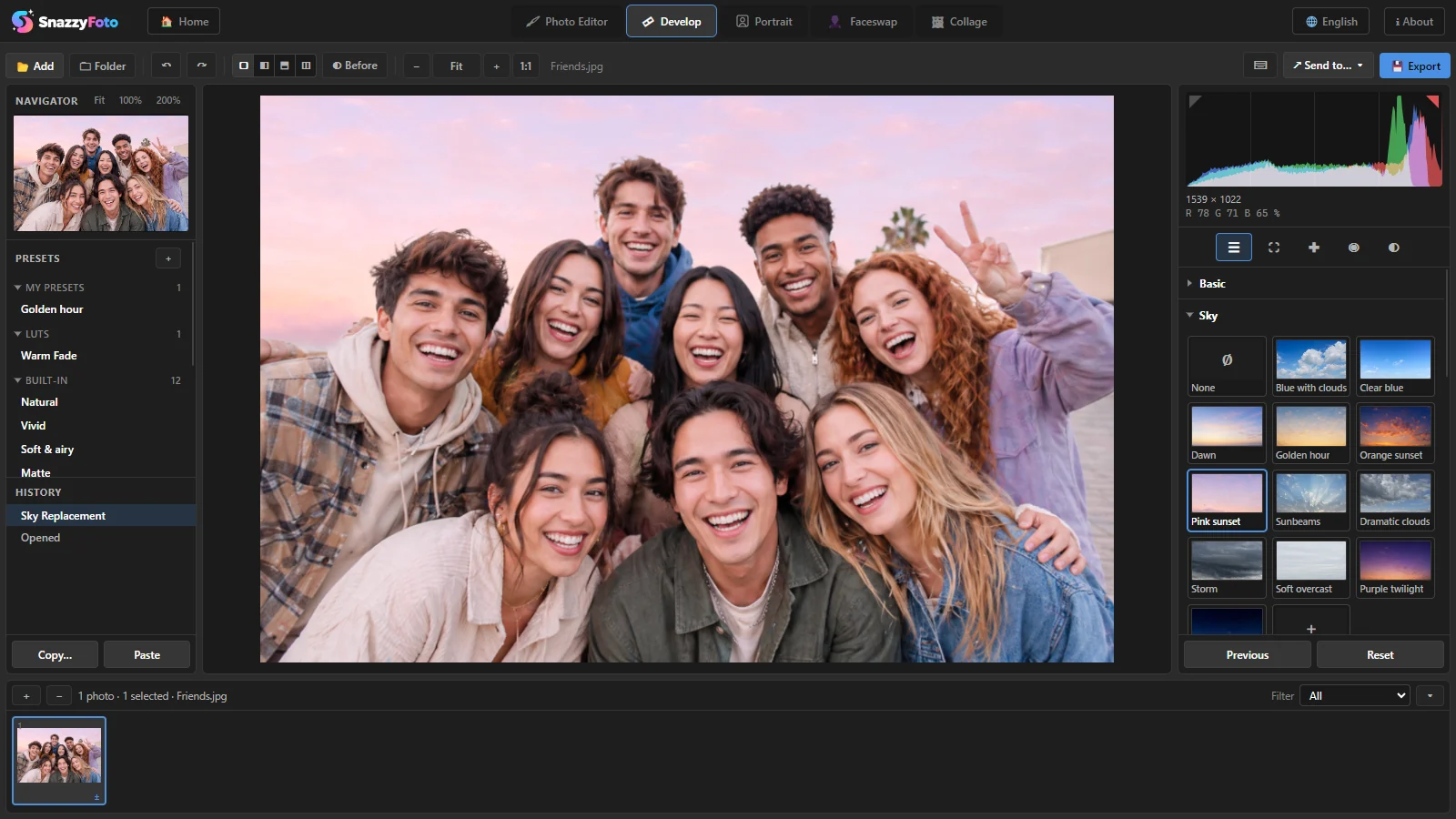 123
- 1 The Sky panel, right under Basic in Develop.
- 2 The skies — click one to use it.
- 3 The photo with its new sky.
Replace the sky
- Open the photo in Develop.
- Open the Sky panel on the right (click its title if it is closed).
- Click a sky. The first time, Finding the sky… appears while the AI looks for the sky in your photo; that takes a few seconds.
- The new sky appears. Fine-tune it with the sliders below the skies.
- Export the photo as usual. Your original file is never changed.
The new sky is put in before all your other Develop settings. So Basic, the tone curve, colour grading and presets change the new sky too, and the whole photo keeps one look.
The 12 built-in skies: Blue with clouds, Clear blue, Dawn, Golden hour, Orange sunset, Pink sunset, Sunbeams, Dramatic clouds, Storm, Soft overcast, Purple twilight and Milky Way. Your own… lets you pick a sky photo of your own, and None takes the new sky away again.
The settings
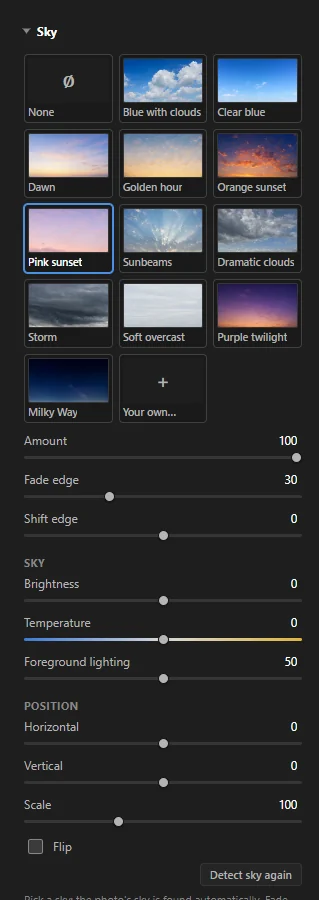 12345
- 1 The skies.
- 2 The edge: Amount — how much of the new sky shows (lower it to let the old sky through). Fade edge — how soft the border between sky and land is. Shift edge — moves the border down into the land or up into the sky.
- 3 Sky: Brightness and Temperature of the new sky only. Foreground lighting — gives the land and the people the colour of the new sky, so a sunset sky makes them warmer. At 0 they keep their own colour.
- 4 Position: Horizontal, Vertical and Scale move and enlarge the sky picture; Flip mirrors it, for example to put the sun on the other side.
- 5 Detect sky again — looks for the sky once more.
SnazzyFoto already matches the brightness of the new sky to the old one, half way. For the most natural result, pick a sky with light from about the same side and time of day as your photo, then use Foreground lighting.
Many photos at once
Each photo finds its own sky. To give several photos the same sky, use Copy… / Paste or Sync and tick Sky; it is not ticked by default. Batch export finds the sky in every photo that needs it. See Edit many photos at once.
If you turn or flip a photo later, its sky is found again by itself.
When to use something else
- Portraits and product photos — use Portrait › Background. It looks for the person or object instead of the sky.
- Only darker or bluer, not a new sky — a Sky mask in Masking changes the photo's own sky.
- 360° photos — the Sky panel is hidden for them.
In the free version
Sky Replacement is a Supporter feature: clicking a sky opens the Supporter feature window. See Free and Supporter.
Questions
It says "No sky found in this photo."
The AI found no sky — for example in an indoor photo, or when the sky is only a tiny part of the picture.
Trees or buildings have a halo, or the new sky covers part of them.
Move Shift edge and Fade edge a little. If a whole part is wrong, click Detect sky again.
What makes a good sky photo of my own?
A wide, sharp photo of only sky, at least as wide as your photo, taken with the camera level. SnazzyFoto places its bottom edge just below your horizon and mirrors it at the sides when it isn't wide enough.