
Free and Supporter
What is free, what a one-off donation unlocks, how to donate and activate from the app, and managing your computers.
SnazzyCut is free, with every editing feature. A one-off donation — pay what you want, from a small minimum — makes you a Supporter and unlocks full-resolution export, the AI editing tools and colour themes on your computer.
Free and Supporter
| Free | Supporter | |
|---|---|---|
| Every editing feature: cuts, titles, transitions, effects, colour, sound, keyframes | ✓ | ✓ |
| Captions and narration made on your computer | ✓ | ✓ |
| No watermark, no time limit | ✓ | ✓ |
| Video export | 720p at any length; 1080p for videos up to 3 minutes | Full resolution at any length: 1080p, 4K |
| AI Auto-Edit (with your own AI key) | — | ✓ |
| Edit with Claude or Codex (MCP) | — | ✓ |
| Colour themes: Light, Midnight, High contrast, Paper, Brutalism, your own colours | Dark only | ✓ |
| Donation reminder | Sometimes | Never |
- 720p and 1080p mean the shorter side of the picture is at most 720 or 1080 pixels. The length is what you export: the part between the in and out points when they are set, otherwise the whole timeline. So in the free version a 2-minute 1920×1080 video stays 1920×1080, and a 5-minute one comes out as 1280×720. See What the free version exports.
- In the free version, proxies and rendered previews are made at up to 720p, also for short videos. That only affects the preview while you edit.
- The free version uses the Dark theme. Choosing another theme shows a short Supporter screen instead (see Colour themes).
- The title bar shows Free version until you activate. Click it to donate or sign in.
 12
The donation reminder
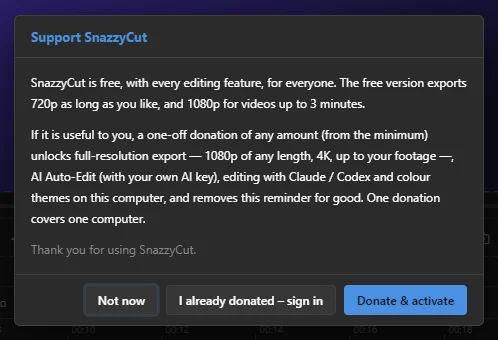
In the free version, a short Support SnazzyCut window may appear a few seconds after SnazzyCut starts. It never appears in your first 7 days, at most once a day after that, and never during an export or over another window.
 123
- 1 Not now — closes it. Pressing a key while you edit also picks this one, so a stray key never opens a browser.
- 2 I already donated – sign in — for when you have donated already.
- 3 Donate & activate — donate and unlock this computer (see below).
How donating works
- Pay what you want. Choose an amount or type your own, from the minimum shown on the donation page.
- One-off. It is not a subscription. You pay once and the computer stays unlocked.
- One computer per donation. Each donation unlocks one computer. Donating again — or choosing more Computers on the donation page — adds more.
- Payment goes through Midtrans, in rupiah (you can also enter the amount in US dollars; the page shows the rupiah total). SnazzySoft never sees your card details.
Donate & activate from the app
This is the easiest way: one trip to the browser, and SnazzyCut comes back unlocked.
- In SnazzyCut, choose Help › Register… (or click Free version in the title bar, or Donate & unlock on the Home screen).
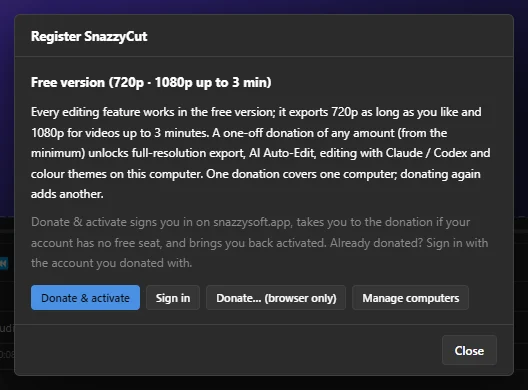
- Click Donate & activate. Your browser opens snazzysoft.app, and SnazzyCut shows Waiting for the browser….
- Sign in, or create an account.
- If your account has no free computer yet, the donation page opens. Choose an amount and click Donate, then pay in the Midtrans window.
- When the payment is confirmed, the page returns to SnazzyCut by itself. SnazzyCut says Thank you for supporting SnazzyCut!, and everything is unlocked.
 1234
- 1 Donate & activate — sign in, donate if needed, come back activated.
- 2 Sign in — for an account that has already donated.
- 3 Donate… (browser only) — opens the donation page without activating this computer. Use Sign in afterwards.
- 4 Manage computers — opens the list of your computers on the website.
While SnazzyCut is waiting for the browser, a Cancel button stops the wait. If you start a big export in the free version, the same Donate & activate choice appears, and the export carries on at full resolution once you are activated.
I already donated – sign in
Donated on the website, or setting up a new computer? Choose Help › Register… › Sign in (or I already donated – sign in in the reminder, or Already donated? Sign in on the Home screen). Sign in with the account you donated with, and SnazzyCut is activated if the account has a free computer.
Managing your computers
Every computer you sign in on uses one of your donations. To see them, click Manage computers in SnazzyCut, or open My devices in your dashboard on snazzysoft.app (/dashboard/devices).
- The page lists each computer with its name, platform, app version and when it was last seen, and how many seats are used (for example 1 / 2 seats used).
- Unlink a computer you no longer use to free its seat. Then sign in on the new computer.
- From SnazzyCut itself: Help › Register… › Log out / unlink this computer. Your donation stays on your account; you can sign in again at any time, here or on another computer.
If every computer on the account is in use, signing in says so. Free one under Manage computers, or donate again to add a computer.
Working offline
A Supporter licence is for life. Once a computer is activated, SnazzyCut never needs the internet again to stay unlocked. A lost connection, a slow network or a server that cannot be reached never takes your licence away.
The internet is only needed to sign in, to donate, and when you change something on the website (for example if you unlink this computer there, SnazzyCut asks you to sign in again the next time it can check).
For supporters: the thank-you window
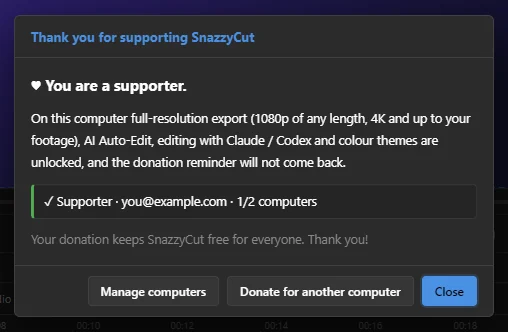
As a Supporter, Help › Support SnazzyCut… shows a thank-you window instead of the reminder.
 123
- 1 Your status: Supporter, the account's email, and how many of your computers are in use.
- 2 Manage computers — the list of your computers on the website.
- 3 Donate for another computer — opens the donation page to add a seat.
Thank you — your donation keeps SnazzyCut free for everyone.
Questions
I bought a new computer. Do I have to donate again?
No. Unlink the old computer in My devices on the website (or with Log out / unlink this computer on the old one), then sign in on the new computer.
Do I need to sign in again after an update, or after reinstalling Windows?
Updating SnazzyCut keeps the activation. After reinstalling Windows, the computer counts as a new one: unlink the old entry in My devices and sign in again.
I paid, but SnazzyCut still says Free version.
Choose Help › Register… › Sign in, and sign in with the same account you donated with. If it says every computer is in use, free one under Manage computers. See also My export is smaller than the size I chose.